Showing posts with label BIBLE STUDY SOFTWARE. Show all posts

Saturday, 20 April 2013

e-Sword Bible Study Software

e-Sword is a Bible study computer software package created by Rick Meyers and developed for Microsoft Windows, Pocket PC, and the Apple iPad. The package aimed to supply basic operating system and older out of copyright content as freeware.[1][2]
e-Sword development started in January 2000. It has continually grown in popularity, reaching 20,000,000 downloads in January 2012.[3] The user interface is available in twenty seven different languages. Resources are available in over eighty languages.

Purpose

Rick Meyers aspired to make Bible study freely available to anyone, while also providing power and depth to research. His theme verse is Matthew 10:8 "Freely you receive. Freely give". Rick Meyers states on the e-Sword homepage:
As a Bible student and teacher I have experienced the necessary work involved in searching the Scriptures for the competent preparation of a Bible study, Sunday school lesson, or a sermon. There are volumes of books available as study tools (and the Christian community is indebted to the various authors' perseverance and scholarship), but there is not enough time, money, or shelf space to properly take advantage of these resources. Computer software has changed the way we can study the Word of GOD. With a simple search or click of the mouse button, we now have access to these same volumes of scholarship within seconds![4]

Different versions

Pocket e-Sword 1.0 was released in December 2003. By May 2007 there had been 1,000,000 downloads of Pocket e-Sword.[3] This is the version that runs on the Pocket PC. Pocket e-Sword 3.0.1, released 17 May 2007, was the last version to be released for Pocket PC 2002, Pocket PC 2003, and Windows Mobile 5.0. Released in June 2009, Pocket e-Sword 3.1.0 runs only Windows Mobile 6.0 and higher. Released in December 2009, Pocket e-Sword 3.2.0 runs only Windows Mobile 6.0 through Windows Mobile 6.5. On 12 December 2009, it was officially announced that there would be no future development of Pocket e-Sword.
Development for e-Sword Live started in November 2007. It went public in May 2008. This is the web based version. Rick Meyers actively promotes this version for users of platforms other than Windows.
e-Sword HD was publicly released on 15 OCtober 2012. This is a port of e-Sword to the iPad. Version 1.0 supported English only.

e-Sword Live Features

The web version can display Bibles, Commentaries, Dictionaries, Lexicons, and Topical Bibles

Pocket e-Sword Features

In addition to displaying Bibles, Commentaries, and Dictionaries, Version 3.1.0 offers the following components:
  • Bible Markup Overlay
  • Bible Reading Plan
  • Bookmarks
  • Devotional
  • Prayer List
  • Scripture Memory Verse List
  • Study Notes
  • Topical Notes
These components offer similar functionality to the e-Sword equivalents. Study Notes and Topical Notes are RTF text files, rather than a database.

e-Sword HD Features

In addition to Bibles, Commentaries and Dictionaries, Version 1.0 offers the following components and functionality:
  • Bible Markup Overlay
  • Bible Reading Plan
  • Bookmarks
  • Devotional
  • Prayer List
  • Scripture Memory Verse List
  • Study Notes
  • Topical Notes

e-Sword Features

In addition to Bibles, Commentaries and Dictionaries, Version 10.0.5 offers the following components and functionality:
  • Bible Markup Overlay
  • Bible Reading Plan
  • Bookmarks
  • Devotional
  • Gospel Harmony
  • Journal
  • Map/Graphic Viewer
  • Localization
  • Prayer List
  • Reference Library
  • Resource Download Manager
  • Scripture Memory Verse List
  • SermonAudio.com Integration
  • Sermon Illustrations
  • STEP viewer
  • Study Notes
  • Topical Notes
  • Verse Analysis Tool
The program allows the user to view the text of the Bible, Bible commentaries, study notes and dictionaries. Through its customizable layout the user can chose which of these resources to view at once, or how they are arranged on the screen.


e-Sword is a fast and effective way to study the Bible. e-Sword is feature rich and user friendly with more capabilities than you would expect in a free software package. The fact that e-Sword is free is just one of the blessings and does not speak of the quality of the software. I make my living writing software and I believe I have put forth my best effort in this endeavor. The real work, however, was put in by the godly men and women who devoted countless years creating the texts that have been made available for our benefit.
In His service,
    Rick Meyers


The Word Bible Study Software

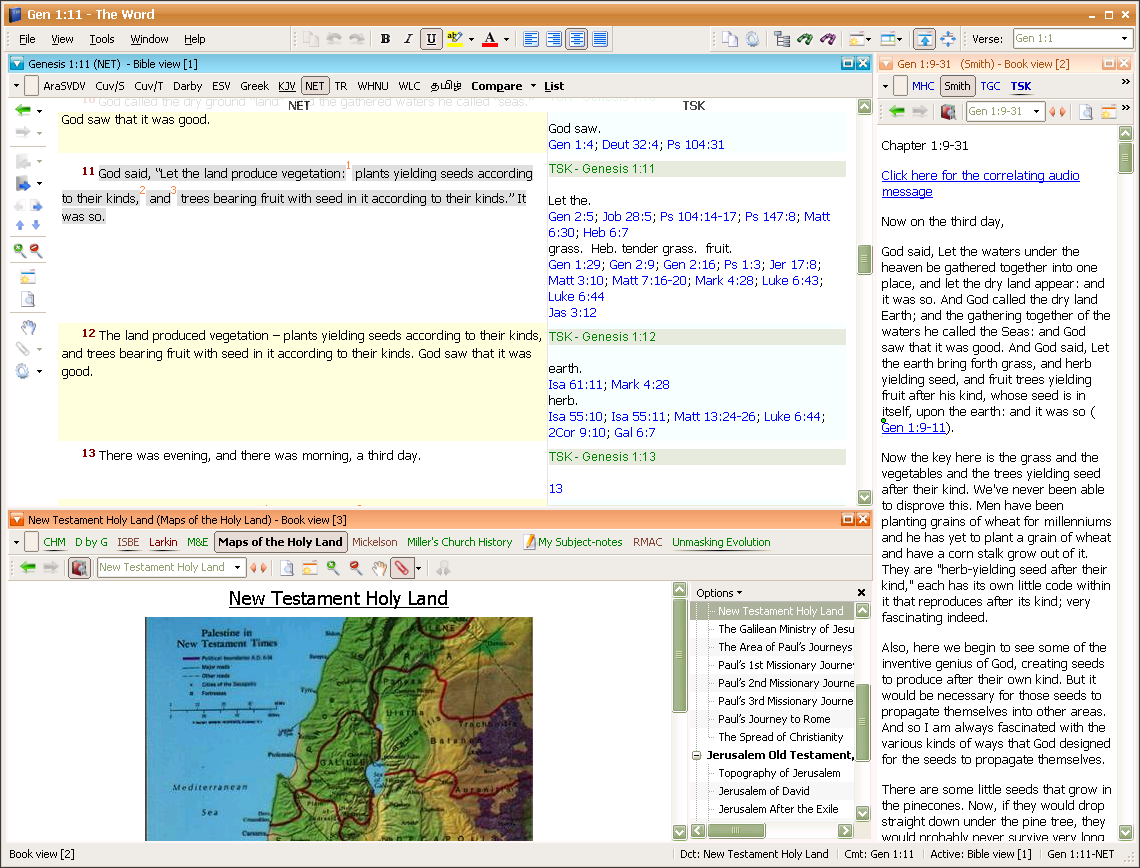
The Word (short for In the beginning was The Word) is a free Bible study software application for Microsoft Windows. It was first released in 2003 by its developer, Costas Stergiou. Though created mainly as a proof of concept Bible viewer,[1] The Word has developed into a comprehensive and powerful Bible study application,[2] offering not only Bibles, but also commentaries, dictionaries, general books, maps, etc. The Word also provides advanced, full library search capabilities. The Word is an internationalised application, featuring support for Bibles in many different languages, and user-interface localizations

Features

The Word supports the following features:
  • Easy to use[1]
  • Quickly search through Bible texts[2] and annotations
  • Support for non-Bible resources (commentaries, dictionaries, generic books)
  • Compare/Parallel view
  • Ability to create and edit complete user modules of any kind (dictionary, commentary, maps, etc.)
  • Cross references (either embedded in Bible texts, or user defined)
  • Advanced hyperlinking in modules to Bibles, internal locations, or other modules
  • Clipboard Monitor the Windows clipboard to display the text of copied verse references
  • Inline commentaries and word lookup dictionaries
  • Support for right to left languages
  • Support for Strong's Numbers, Greek morphological codes, and numerous other viewer options
  • Support for Footnotes
  • Support for non-Bible documents (commentaries, dictionaries, generic books)
  • Greek and Hebrew Support
  • Configurable interface[2]
  • User defined and saved window layouts
  • Advanced, full library search capabilities
  • User markups and highlighting
  • Verse lists
  • Highly customizable UI with skin support
  • Support for purchasing copyrighted, priced modules
  • The ability to create & distribute user created modules as is done at DoctorDaveT.com

Vision

"To provide top quality software to aid fellow believers in the teaching and proclamation of God's Word free of charge" - Costas Stergiou

Version History

Below is a brief summary of version information.
  • Version 1.0: First non-beta release, Clipboard Monitor feature introduced
  • Version 1.1: Ability to print Bible texts and personal notes, and export personal notes in various formats
  • Version 1.2: Improved Greek support in non-Greek environments
  • Version 2.0: Multiple Bible windows, Bible text formatting, Dockable windows and layouts
  • Version 3.0: Integration of non-Bible resources, search capabilities for them, priced copyrighted modules, user-created modules
  • Version 4.0: Current version, new program icon, first alpha implementation of hybrid modules (books+commentaries), new default tw4 theme

The Word Importer Tool

The Word Importer Tool is used for importing Unbound Bible, Zefania XML, and free e-Sword modules and using them in The Word.[2] The Importer Tool does not allow importing of modules purchased from e-Sword.
Examples of how the converter tool works to convert modules to The Word can be seen in the modules available at DoctorDaveT.com.

The Word Portable

 The Word portable is a portable version of The Word that can be installed to a USB flash drive. The installer is included in the main installer of version 3.0, which gives the option of installing as portable.

BIBLE SOFTWARE WITHOUT A PRICE!!!